An Introduction to Colour Modes
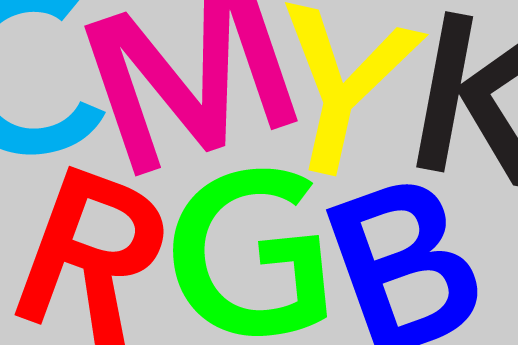
Before sending your artwork off to print, it’s always worth double checking the colour mode of the file. This is important, as it affects the way the colours will look when printed. (more…)
These typography tips will ensure the type within your piece of design is a success – whether it is paper based, for the screen or for t-shirt screen printing…
Know that much like trends in fashion and style, typefaces too are effected in the same way. It’s good to know what’s ‘in’ but try not to rely too heavily on trends, because just using the latest typeface won’t make your work instantly great. Instead of simply surfing the net for new fonts, open a book, and research some tried and tested classics.
Less is more! So limit yourself. If you have ten different typefaces within one piece of design, it’s going to look crowded and cluttered. Remember, you can create variety in other ways like experimenting with font size, weight or case.
Quick design lesson. Sans serif = type with no small projecting features called at the end of strokes. Sans serif fonts have a slightly more contemporary and clean feel to them, but a classic serif can be a great choice too.
Use leading, kerning and tracking to make sure there’s room for your type to be read and digested properly.
Leading = the space between the base lines of text.
Kerning = is the spacing in between individual characters.
Tracking = is the space between groups of letters rather than individual letters.
Whether you’re designing type within a logo or laying out a long-format piece, don’t just let the default setting decide.
This pretty much only applies to print/paper based design. The easiest way to make something look sophisticated and tasteful is to make the type smaller. Not illegibly small, but take a second look at your layout and see if you can’t nudge everything down a couple of point sizes. Having said that, tiny text doesn’t print onto garments that well – so don’t go too small when t-shirt screen printing or direct to garment printing. Small text is also problematic when creating logos for polo shirt embroidery.
Just because you downloaded a typeface off the web or from a friend doesn’t mean you can use it wherever you want. Like stock photography: you have to know the copyrights before it goes to print.
When choosing typefaces to work together, make sure they complement each other instead of matching. If you choose two that are too similar, it might look like a mistake or an inconsistency in the font.
Sometimes it’s easy to get so caught up in the ‘look’ of things; there might be an amazing photo behind it, black on black might be super-slick, and the type might be tiny – and that’s the look you’re after. But at the end of the day, the single most important thing is that it is legible!
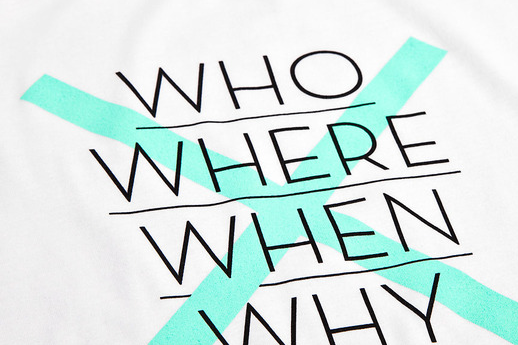
Be aware, some fonts that have fine, hair line sections – such as the font shown above. Those light lines won’t screen print well, so choose carefully.
Picking the perfect typefaces can take a lot of work. It’s easy to start using your personal ‘defaults’ or favourite pairings. It’s worth spending time discovering new options, and making sure you’ve covered the above pointers.
Icon Printing are based in Shoreditch, London and are t-shirt direct to garment and t-shirt screen printing specialists. For more an instant quote, please visit our website. You can email us at: sales@iconprinting.com, or call on: 0207 183 8431
You’ll need to find out the maximum print dimensions for the print method you have in mind. For example, our standard direct to garment printing and screen printing dimensions are 350mm wide x 450mm high. This area will vary depending on the printing company, as most can not go overly close to seems or hems. We also have oversized screens and “all-over” printing available.
2. What are your turnaround times?
Some places can pop a few t-shirts out in a day, others need a few days to process your order. If you’re pushed for time, then this will be a top priority question for you. Here, most jobs are turned around in 4 to 7 working days, but we’re also able to work to an express turnaround that comes at a slightly higher charge.
3. Do you have a minimum order?
This will vary depending on what print process you’re after. T-shirt screen printing will always come with a minimum order quantity, due to the screen set up. Our minimum order for screen printing is 20 items, and for all other print processes (direct to garment, embroidery and transfer printing) our minimum order is 10 units of the same design. We are able to print a direct to garment sample, this sample cost is then refunded once you place a higher order.
4. Are there any hidden fees?
Be aware of illusive set-up charges. Screen Printing will always come with set-up cost – which we are very honest about right from the beginning. However, the great thing about direct to garment t-shirt printing, is that there are no set up costs. Another thing to watch out for, are charges that apply to tweaks made to your artwork file. We don’t charge for a slight amend to your artwork file, but some print companies will charge for anything from a text font change to a digital logo colour amendment.
5. Do you offer an artworking service?
Most print places offer an artworking service. What you get for your money for the work carried out can vary quite considerably. Some places will charge £50 an hour to work on your file – so watch out, you may get stung. We don’t charge for small changes – the only time we do charge is when a digital file is created from scratch, for which we charge a flat-rate of £14.95.
6. Do I get a visual proof of my order before my job goes to print?
Before you place your order, check to see if you get a visual proof or “mock-up” of your design on a t-shirt template, so you can double check print proportions and placement. Some places may charge for this service, we don’t however.
7. What digital file types do you accept?
This is an important one! Printers can often accept most file types as long as they are a decent size and hi-resolution, so 300dpi. We prefer .png files (click here to find out how to save your artwork as a .png file) and for Direct to Garment printing, and vector based artwork for tshirt screen printing and polo shirt embroidery.
8. What are your delivery costs?
Our standard delivery UK wide is £9.95. You will need to inquire if you require your printed garments to be sent overseas. Extra costs will occur if you require express or next day delivery. We are able to deliver pre-9am, pre-12 and also on Saturdays.
9. Are you able to match specific colours?
When digital direct to garment printing we are not able to match colours exactly. However, we are with screen printing, so if you have a specific PANTONE colour in mind, do let us know. This will be standard practice across all t-shirt printers london.
10. How do I care for my printed garments?
If you have any queries regarding care of your garments remember to double check with the printers. Each different print technique requires slightly different wash and iron care. The most durable print type is screen printing, the least durable is transfer printing – so bare this in mind.
—
Icon Printing are based in Shoreditch, London and are t-shirt direct to garment and t-shirt screen printing specialists. For more an instant quote, please visit our website. You can email us at: sales@iconprinting.com, or call on: 0207 183 8431
Life in colour (more…)
Here’s why we think embroidered polo shirts are a great way to promote your business…
They’re smart.
Polo shirts are instantly smarter and more professional looking when compared to a crew neck t-shirt. The collar detail, ribbed cuffs and button down detail makes an instant impression and they don’t cost much more than the crew neck t-shirt we supply.
Comfort and wearability.
Polo shirts are indeed smarter, but you don’t have to compromise on comfort. We stock a fantastic range of polo shirts that are ideal for any requirement. For an image conscious brand; we have a selection of slim fit polos to choose from. Where fabric performance is important – we have ClimaCool® polo shirts, and also heavy weight styles for warmth or durability. We also stock long sleeve styles, ladies polos, specialty sports polos and kids polo shirts. And because no one likes ironing, we also stock EasyCare® polos!
Fantastic uniform garments.
Embroidered polo shirts are one of the top garment choices for uniforms. A branded polo is all you need to make a good impression. This is why so many businesses choose it as uniform wear, instead of expensive head to toe bespoke garments.
They’re hard wearing.
As polo shirts are more heavyweight in general (when compared to t-shirts) they are instantly more hard wearing. The fabric is built and manufactured in a completely different way, which means they can withstand constant wear and tear.
Satisfaction guaranteed.
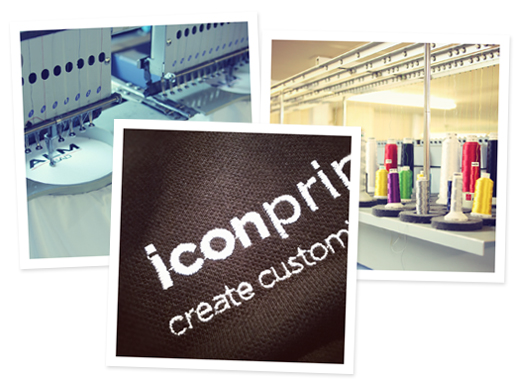
We pride ourselves in creating the best customisation outcome possible. Before any of the garment embroidery goes ahead, we send you an embroidered swatch image of your logo via email in order for you to see the thread colours and composition. Only then do we go ahead with embroidering your chosen polo shirts.
Here at Icon Printing we specialise in digital polo shirt embroidery. We have an experienced team who can customise as few as ten or as many as 1000+ polo shirts. We are able to cater to whatever requirements you may have, such as brand colour matching, over sized embroidery and logo artworking/digitizing. Embroidered polo shirts give an instant professional touch and make a fantastic option for work and team wear.
All our polo shirt embroidery takes place in London, for any further information please don’t hesitate to get in touch.
Email – sales@iconprinting.com
Tel – 0207 183 8431
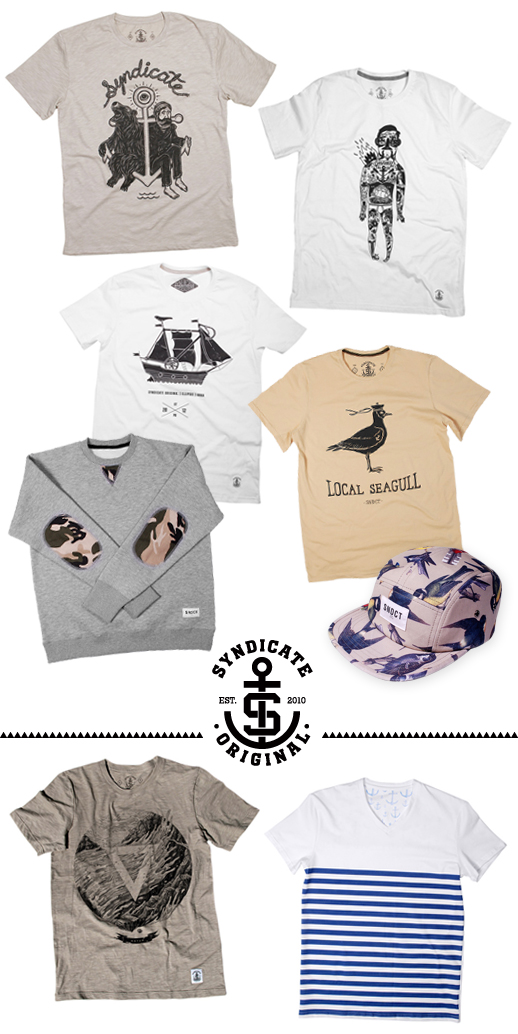
Alongside promotional and corporate clothing, we also print garments for established and up ‘n’ coming clothing labels. Much of this artwork is fashion lead graphics or hand drawn illustrations. Bold, one or two colour designs print really well and can make very desirable items of clothing.
At Icon Printing, we are really passionate about what we do and we’re always on the look out for inspirational printed clothing to post up on our blog. So, check out these bad boys. Syndicate Original is a clothing label from Ukraine, who are inspired by “American heritage and also by the simplicity and minimalism of Scandinavian aesthetics.” Their focus is combining the aesthetics of classic menswear and enhancing cuts and concepts with up-to-date elements. They often collaborate with well-known artists, illustrators and designers which allows them to treat street style in such a unique and fresh way.
If you’ve got a favourite clothing line you think we should shout about, get in touch! We’d love to hear from you. Check out this link for t-shirt printing london information.
email: sales@iconprinting.com
phone: 0207 183 8431
Whether you are a small boutique brand or a large, corporate business; you’ll know how important it is to have a strong logo and brand identity. Almost everything we print here at Icon Printing, relates to a brand or logo in some form or another. Maybe you’re thinking about a re-brand, or you could be a start up without the spare cash to splash out on a bespoke logo – this is a post for you. We’ve come up with a few pointers to follow when creating logos and specific design considerations to look at to insure your logo design reproduces well in all mediums; screen, print and signage.
Before you get stuck into the look or even the “naming” of your logo or business, there’s a few things to bare in mind. What does your company do? Are you local, national or global? Think about your target audience, who are they and what do they do? Are they high, mid or low earners? Who are your competitors and what are they doing? Next, think about where your logo will be displayed – it could be applied to business cards, but also vehicle livery, apparel, a website, etc.
1. Research.
Do your homework! Do as much research as you can in the time available.Research the competition and similar companies. Look at their logos and websites. What kind of image do they project?
Look at details such as colour schemes, typefaces, images, symbols, etc.
Look at unrelated businesses that target a similar audience as yours. What is their visual attraction?
Here are a few important pointers on what not to do when creating your artwork. By following these guidelines it will maximise the quality of your screen printed garment.
1. Web Images
Using images from the web can be handy, but note that most of the time these images are very small and set to only 72 dpi (very low image quality). Web designers use the lowest resolution and size possible so that their pages load fast while keeping the images looking good. Due to this, the image downloaded is designed to look good at the relatively small size it appears on screen and not printed out here in the real world. When it comes to screen printing, these forms of photo images should be avoided altogether – but vector based images are absolutely fine.
As shown above, many internet images are very pixelated and blurred.
2. Details
Try to avoid very small negative spaces as they can fill in or “bleed”. Ink is a fluid and therefore spreads a little bit by nature. So a very small negative space (such as the words “Screen Printing” – shown in the image below) can be filled in by the ink that surrounds it pretty easily. However, there is no hard and fast rule for avoiding bleed on small type/detailing, so every piece of artwork will be evaluated on a case by case basis. However, a good general guideline is to use fonts at or above 12 points and lines or outlines stroke size larger than 0.3 pt.
The fine or “light” version of this typeface is not a good choice, the hairline box detail also wouldn’t print.
3. Illustrator Effects
Illustrator has some cool effect options, but you’ve got to be careful when using them – especially when creating artwork for screen printing. Try to avoid drop shadow or gradient effects. These often look good (at first glance) and add dimension, but they complicate your file by mixing image types and this type of effect doesn’t translate to the screen successfully. If you do want a slight shaded area effect or gradient within your design or logo, it will need to be made up of a series of very small dots (when viewed close-up) that from a distance, create the look of a gradient or difference in tone. It is more time consuming, but the outcome is a much better print.
4. Transparencies
In Illustrator, when two shapes overlap and the one on top has opacity set lower than 100%, the color of the shape below it will affect its color. For example (see below), when the circle on the bottom is red and the one on top is blue with 50% opacity, the overlapping portion is violet. But when it comes down to printing, it almost never works out like that due to unpredictable ink transparencies and intermingling pigments. If you’ve got a red + blue = violet type scenario, use a spot color violet instead of transparencies.
5. Problem Colours
Inks have varying degrees of transparency. A few color ranges are very transparent and do not look good when printed on a particular colour under base – whether that’s another ink layer or your actual garment colour. This can leave areas looking splotchy, washed out and generally poor. Darker blues tend to be one of these and, unless you’re printing on to white garments, avoid using them. Another one to look out for, is bright fluorescent inks, they too are very transparent and tend to lighten up and lose brightness when printed on an under base.
If you have any questions about your artwork, we are here to help! Drop us an email or just give us a ring –
sales@iconprinting.com or on 0207 183 8431
This is a quick tutorial on how to save your artwork ready for DTG (direct to garment) printing.
Here are a few pointers to remember:
When creating a .PNG file to be DTG printed, make sure your artworks colour mode is set to RGB – otherwise it will not save as a .PNG file.
The best file type to create a print from is either an Illustrator .ai or .eps file (a vector file) or a high resolution .jpg file – that is at least 300 dpi and saved at 100% of the intended print size.
For more information on DTG printing in general.
So, this is how you save a 300 dpi image in Photoshop as a transparent PNG for DTG printing.
To make things a little easier, we’ve made you a lovely PNG template.
Now create your artwork. If you’re using a logo you’ve made, a photo you’ve taken or even an illustration you’ve created, make sure it’s not sitting on a white background (unless you want it to), as this will print. For example…
Once you’ve created your artwork, it’s time to save it. You can maintain the transparency on the file, as we’re able to print full alpha, but remember any transparent areas will show the colour of whatever shirt you chose to print onto.
Having used our downloadable template, your file will already come up as a .png so just rename it and hit save. Don’t worry about the layers warning that may come up, your file will still save fine. A small PNG options window will then pop up, just tick the NONE option and you’re done.
Any questions on direct to garment printing? Give us a ring!
0207 183 8431
Loading custom options…